The 2014 7Seas Fall Fishing Festival runs November 14-17, 2014. Come visit us at the Diamond Synthesis/Triple J Fishing fishing spot where you can catch a Whisper Lanyard and check out our new Tally Board, which tracks both high and cumulative scores from multiple fishing contests and broadcasts results to a contest pot.
The Whisper Lanyard is a SUR custom catch. It will be easiest to catch on Friday and will become harder to catch each day.
Stay baited and keep casting!
Wednesday, November 12, 2014
Whisper Lanyard
(DS) Whisper Lanyard reports 7Seas fishing contest leaders, remaining contest time, and your score. Also, it warns you when you are low on bait. The lanyard lets you follow a contest by looking only at the chat window. The lanyard chats in local chat to only you.
The Whisper Lanyard is only available as a custom catch at the 7Seas Fall Fishing Festival, November 14-17, 2014 at the Diamond Synthesis/Triple J Fishing fishing spot.
The Whisper Lanyard improves the "seahorse" Whisper by showing either that you are on the leaderboard or how many points behind the leaders you are.
Usage:
To add your photo to lanyard badge, rez the lanyard on the ground, then drag your photo to the badge where it says "Drag Photo Here". Take your lanyard back into inventory.
To use, wear (DS) Whisper Lanyard. The default attachment is "chest". You can resize the lanyard by editing.
To change the color of the lanyard, touch it to get the menu then click "Next Color".
You must be wearing the lanyard at the beginning of a contest to get remaining contest time and your score.
If you do not want the lanyard to chat, click "Whipser Off". To resume chatting, click "Whisper On";
When a contest starts, the lanyard automatically locks to that contest board. At contest end, the lanyard automatically unlocks. To manually unlock, click "Whisper Off" then "Whisper On". Do this if you leave a contest before it finishes and go to another contest.
Questions? Contact Diamond Marchant via IM.
The Whisper Lanyard is only available as a custom catch at the 7Seas Fall Fishing Festival, November 14-17, 2014 at the Diamond Synthesis/Triple J Fishing fishing spot.
The Whisper Lanyard improves the "seahorse" Whisper by showing either that you are on the leaderboard or how many points behind the leaders you are.
Usage:
To add your photo to lanyard badge, rez the lanyard on the ground, then drag your photo to the badge where it says "Drag Photo Here". Take your lanyard back into inventory.
To use, wear (DS) Whisper Lanyard. The default attachment is "chest". You can resize the lanyard by editing.
To change the color of the lanyard, touch it to get the menu then click "Next Color".
You must be wearing the lanyard at the beginning of a contest to get remaining contest time and your score.
If you do not want the lanyard to chat, click "Whipser Off". To resume chatting, click "Whisper On";
When a contest starts, the lanyard automatically locks to that contest board. At contest end, the lanyard automatically unlocks. To manually unlock, click "Whisper Off" then "Whisper On". Do this if you leave a contest before it finishes and go to another contest.
Questions? Contact Diamond Marchant via IM.
Tally Board
The (DS) Tally Board by Diamond Synthesis is a 7Seas-compatible plug-in that tracks both high and cumulative scores from multiple fishing contests and broadcasts results to a contest pot. The Tally Board will be available on November 14, 2014, coinciding with the 7Seas Fall Fishing Festival.
The Tally Board does not start contests, rather, it only tracks scores. This allows you to give prizes based on scores from multiple contests that you start, for example, your daily or weekly hosted events. Features include:
~ Tracks high scores from all rounds, highest score wins.
~ Optionally, sums scores for all rounds, highest total wins.
~ Tracks scores from multiple contest boards (contests cannot overlap).
~ Allows tally to end after a specified number of rounds.
~ Allows tally to end when a specified high score is reached.
~ Allows tally to end when you or an admin click the Finish button.
~ Allows tally to be abandoned or a round to be skipped.
~ Broadcasts results for the top ten plus ties to a contest pot (e.g. (DS) Gold Pot, Silver Pot, Bronze Pot, Chrome Pot).
~ Requires a contest pot for giving out prizes.
~ Provides configuration via menus (no notecards).
~ Locks to up to 4 contest boards.
~ Locks to (DS) contest pots.
~ Allows adding/removing up to 9 admins.
~ Allows tally to be automatically repeated.
~ Displays the top five leaders in prim text, color-coded by place, and the top ten plus ties in hovertext. Shows ties.
~ Displays the top scores of the previous tally in hovertext.
~ Allows only 1 score per avatar.
~ Allows your own 40-character message in prim text.
~ Provides setup information to fishers via info button.
~ Allows display to be turned off/on.
~ Similar appearance to (DS) Series Board.
~ Rezzes posts on the back of the board.
~ Becomes transparent or opaque.
~ Supports up to 120 fishers per round.
~ Supports up to 200 fishers when summing scores.
~ Package includes (DS) Board Relay for extending the broadcast range of contest boards for solo contests.
~ Survives sim restarts.
Purchase and update at Diamond Synthesis Pots & Buckets, http://slurl.com/secondlife/Blung/228/28/21 and Second Life Marketplace (https://marketplace.secondlife.com/ (search for Tally Board).
The Tally Board does not start contests, rather, it only tracks scores. This allows you to give prizes based on scores from multiple contests that you start, for example, your daily or weekly hosted events. Features include:
~ Tracks high scores from all rounds, highest score wins.
~ Optionally, sums scores for all rounds, highest total wins.
~ Tracks scores from multiple contest boards (contests cannot overlap).
~ Allows tally to end after a specified number of rounds.
~ Allows tally to end when a specified high score is reached.
~ Allows tally to end when you or an admin click the Finish button.
~ Allows tally to be abandoned or a round to be skipped.
~ Broadcasts results for the top ten plus ties to a contest pot (e.g. (DS) Gold Pot, Silver Pot, Bronze Pot, Chrome Pot).
~ Requires a contest pot for giving out prizes.
~ Provides configuration via menus (no notecards).
~ Locks to up to 4 contest boards.
~ Locks to (DS) contest pots.
~ Allows adding/removing up to 9 admins.
~ Allows tally to be automatically repeated.
~ Displays the top five leaders in prim text, color-coded by place, and the top ten plus ties in hovertext. Shows ties.
~ Displays the top scores of the previous tally in hovertext.
~ Allows only 1 score per avatar.
~ Allows your own 40-character message in prim text.
~ Provides setup information to fishers via info button.
~ Allows display to be turned off/on.
~ Similar appearance to (DS) Series Board.
~ Rezzes posts on the back of the board.
~ Becomes transparent or opaque.
~ Supports up to 120 fishers per round.
~ Supports up to 200 fishers when summing scores.
~ Package includes (DS) Board Relay for extending the broadcast range of contest boards for solo contests.
~ Survives sim restarts.
Purchase and update at Diamond Synthesis Pots & Buckets, http://slurl.com/secondlife/Blung/228/28/21 and Second Life Marketplace (https://marketplace.secondlife.com/ (search for Tally Board).
Sunday, July 27, 2014
Gold/Bronze Pot Update 110.2
The (DS) Gold Pot and (DS) Bronze Pot are updated to version 110.2.
This update includes the following changes: The "house rake" and "buyin" features are deprecated, that is, they are no longer supported. The "house:", "buyin:", "team buyin:", and "buyin period:" configuration lines are no longer recognized.
If you have a Gold or Bronze Pot, you may get the update by going to the Bit Bucket at the Pots & Buckets store ( http://maps.secondlife.com/secondlife/Blung/228/25/21 ) and WEARing your Gold or Bronze Pot. The Bit Bucket will give you the 110.2 package.
This update includes the following changes: The "house rake" and "buyin" features are deprecated, that is, they are no longer supported. The "house:", "buyin:", "team buyin:", and "buyin period:" configuration lines are no longer recognized.
If you have a Gold or Bronze Pot, you may get the update by going to the Bit Bucket at the Pots & Buckets store ( http://maps.secondlife.com/secondlife/Blung/228/25/21 ) and WEARing your Gold or Bronze Pot. The Bit Bucket will give you the 110.2 package.
Wednesday, April 23, 2014
2014 7Seas Fishiversary
The 2014 7Seas Fishiversary is on April 25-28. Come visit the Diamond Synthesis/Triple J Fishing fishing spot!
Our custom catch is (DS) Whisper, which reports 7Seas fishing contest leaders, remaining contest time, and your score. Also, it warns you when you are low on bait. (DS) Whisper lets you follow a contest by looking only at the chat window. To use, wear (DS) Whisper. The default attachment is "left shoulder". (DS) Whisper chats in local chat to only you.
Be sure and visit Diamond's Merhouse beneath the dock.
Our custom catch is (DS) Whisper, which reports 7Seas fishing contest leaders, remaining contest time, and your score. Also, it warns you when you are low on bait. (DS) Whisper lets you follow a contest by looking only at the chat window. To use, wear (DS) Whisper. The default attachment is "left shoulder". (DS) Whisper chats in local chat to only you.
Be sure and visit Diamond's Merhouse beneath the dock.
Wednesday, August 7, 2013
Copper Pot Now Available
The (DS) Copper Pot by Diamond Synthesis is a 7Seas-compatible plug-in for the (7S) Bounty Hunt Contest board. The pot accepts money (L$) donations, pays money prizes, and delivers non-money prizes and bait based on the rarity of the Bounty Hunt catch.
The Copper Pot is configured entirely from the menu, that is, a "config" notecard is not used.
~ Supports 7Seas Bounty Hunt contests.
~ Setup via menus. No notecards.
~ Accepts money donations and pays money prizes based on catch rarity.
~ Gives out bait based on catch rarity.
~ Gives out up to 20 prizes (e.g. custom trophy) based on catch rarity.
~ Displays payout and prize information over the pot, paged text if text exceeds display limit.
~ Handles "no copy" prizes such as the (7S) Bait Bucket, automatically.
~ Allows adding prizes and bait at any time.
~ Checks pot inventory for missing prizes and bait.
~ Allows configuring a "no money" pot for giving only non-money prizes and bait.
~ Allows use of multiple pots to improve performance when giving away items.
~ Locks to a specific Bounty Hunt contest board so that multiple boards/pots can be used simultaneously.
~ Configurable text and text color.
~ Supports adding/removing admins (aka fishing hosts) using the menu.
~ Copy permission, use as many pots as you wish.
~ Modify permission, make your pot look the way you want.
~ Security to prevent hacker/griefer attacks. Works only when the Copper Pot and the Bounty Hunt Contest board have the same owner.
The Copper Pot Guide shows how to set up and use your pot.
Purchase and update at Diamond Synthesis Pots & Buckets,
http://slurl.com/secondlife/Blung/227/25/21
and Second Life Marketplace (https://marketplace.secondlife.com/ (search for Copper Pot).
The Copper Pot is configured entirely from the menu, that is, a "config" notecard is not used.
~ Supports 7Seas Bounty Hunt contests.
~ Setup via menus. No notecards.
~ Accepts money donations and pays money prizes based on catch rarity.
~ Gives out bait based on catch rarity.
~ Gives out up to 20 prizes (e.g. custom trophy) based on catch rarity.
~ Displays payout and prize information over the pot, paged text if text exceeds display limit.
~ Handles "no copy" prizes such as the (7S) Bait Bucket, automatically.
~ Allows adding prizes and bait at any time.
~ Checks pot inventory for missing prizes and bait.
~ Allows configuring a "no money" pot for giving only non-money prizes and bait.
~ Allows use of multiple pots to improve performance when giving away items.
~ Locks to a specific Bounty Hunt contest board so that multiple boards/pots can be used simultaneously.
~ Configurable text and text color.
~ Supports adding/removing admins (aka fishing hosts) using the menu.
~ Copy permission, use as many pots as you wish.
~ Modify permission, make your pot look the way you want.
~ Security to prevent hacker/griefer attacks. Works only when the Copper Pot and the Bounty Hunt Contest board have the same owner.
The Copper Pot Guide shows how to set up and use your pot.
Purchase and update at Diamond Synthesis Pots & Buckets,
http://slurl.com/secondlife/Blung/227/25/21
and Second Life Marketplace (https://marketplace.secondlife.com/ (search for Copper Pot).
Thursday, May 2, 2013
2013 Fishiversary
The 7Seas 2013 Fishiversary event is being held on May 3 thru May 6, so come on down to the Diamond Synthesis/Triple J Fishing build and catch your Blabber Fish. We are located here...
Our little booth
The Blabber Fish announces the leaderboard in open chat and has various customization options, including the ability to automatically blab at regular intervals.
Getting sleepy... come visit our Nap Room (up the stairs in the back).
Our little booth
The Blabber Fish announces the leaderboard in open chat and has various customization options, including the ability to automatically blab at regular intervals.
Getting sleepy... come visit our Nap Room (up the stairs in the back).
Monday, January 21, 2013
Chrome Pot Now Available
The (DS) Chrome Pot by Diamond Synthesis is a 7Seas-compatible
plug-in that accepts money (L$) donations, pays money prizes, delivers
non-money prizes, and broadcasts results to the (DS) LoLLy.
The Chrome Pot supports paying the pot automatically at contest or series end, which allows you to set up a totally automatic operation for a repeating contest series.
The Chrome Pot is configured entirely from the menu, that is, a "config" notecard is not used.
The Chrome Pot is available at Diamond Synthesis Pots & Buckets
http://slurl.com/secondlife/Blung/229/30/21
and on Marketplace.
Features
~ Pay the pot from a bank at contest or series end. This is useful if you are running a repeating contest or series and want a totally automatic operation.
~ Allow owners and admins to pay money to the bank and set the Auto Pay amount.
~ Support solo contests. Handle over 100 fishers.
~ Pay up to 10 places.
~ Split uses proportions and is easy to setup (no figuring out percentages).
~ Give out up to 25 non-money prizes (e.g. bait and/or trophies) according to place.
~ Display payout and prize information over the pot, paged text if text exceeds display limit.
~ Handle ties for money and non-money prizes, including ties for bait buckets and trophies.
~ Handle "no copy" prizes such as the (7S) Bait Bucket, automatically.
~ Allow adding non-money prizes (e.g., bait buckets) at any time.
~ Report missing prizes.
~ Allow configuring a non-money pot for giving only non-money prizes.
~ Allow use of multiple pots to improve performance when giving away items.
~ Lock to a specific contest board so that multiple boards/pots can be used simultaneously.
~ Configurable text and text color for both empty and non-empty pots.
~ Broadcast results, including payout and prizes, to the (DS) LoLLy.
~ Support adding/removing admins (aka fishing hosts) using the menu.
~ Copy permission, use as many pots as you wish.
~ Modify permission, make your pot look the way you want.
~ Security to prevent hacker/griefer attacks.
~ Recover from missing or out-of-order contest board results.
The Chrome Pot Guide shows how to set up and use your pot.
The Chrome Pot supports paying the pot automatically at contest or series end, which allows you to set up a totally automatic operation for a repeating contest series.
The Chrome Pot is configured entirely from the menu, that is, a "config" notecard is not used.
The Chrome Pot is available at Diamond Synthesis Pots & Buckets
http://slurl.com/secondlife/Blung/229/30/21
and on Marketplace.
Features
~ Pay the pot from a bank at contest or series end. This is useful if you are running a repeating contest or series and want a totally automatic operation.
~ Allow owners and admins to pay money to the bank and set the Auto Pay amount.
~ Support solo contests. Handle over 100 fishers.
~ Pay up to 10 places.
~ Split uses proportions and is easy to setup (no figuring out percentages).
~ Give out up to 25 non-money prizes (e.g. bait and/or trophies) according to place.
~ Display payout and prize information over the pot, paged text if text exceeds display limit.
~ Handle ties for money and non-money prizes, including ties for bait buckets and trophies.
~ Handle "no copy" prizes such as the (7S) Bait Bucket, automatically.
~ Allow adding non-money prizes (e.g., bait buckets) at any time.
~ Report missing prizes.
~ Allow configuring a non-money pot for giving only non-money prizes.
~ Allow use of multiple pots to improve performance when giving away items.
~ Lock to a specific contest board so that multiple boards/pots can be used simultaneously.
~ Configurable text and text color for both empty and non-empty pots.
~ Broadcast results, including payout and prizes, to the (DS) LoLLy.
~ Support adding/removing admins (aka fishing hosts) using the menu.
~ Copy permission, use as many pots as you wish.
~ Modify permission, make your pot look the way you want.
~ Security to prevent hacker/griefer attacks.
~ Recover from missing or out-of-order contest board results.
The Chrome Pot Guide shows how to set up and use your pot.
Tuesday, October 9, 2012
Cast-Masters #5 Fishing Hunt
The Cast-Masters #5 Fishing Hunt (CMH) runs from October 10 thru November 10, 2012.
Starting at CC's Kid's Cove (http://maps.secondlife.com/secondlife/Mako%20Cove/87/83/22), fish until you catch a CMH prize. Open the box and use the landmark inside to find the next CMH.
Diamond Synthesis is hosting two CMH fishing areas, Triple J Meadow and Triple J Swan pond.
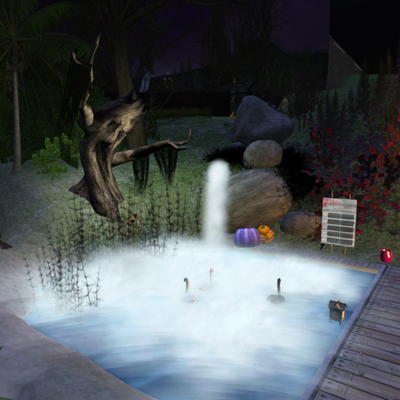
Both areas are in Halloween colors, as you can see from the photos below.
Triple J Meadow (CMH #5)
Triple J Swan Pond (CMH #15)
Starting at CC's Kid's Cove (http://maps.secondlife.com/secondlife/Mako%20Cove/87/83/22), fish until you catch a CMH prize. Open the box and use the landmark inside to find the next CMH.
Diamond Synthesis is hosting two CMH fishing areas, Triple J Meadow and Triple J Swan pond.
Both areas are in Halloween colors, as you can see from the photos below.
Triple J Meadow (CMH #5)
Triple J Swan Pond (CMH #15)
Thursday, November 10, 2011
Diamond Synthesis at 2011 Fall Fishing Festival

Visit the Diamond Synthesis/Triple J Fishing booth at the 7Seas 2011 Fall Fishing Festival from Friday, November 11 thru Monday, November 14.
Our location is http://slurl.com/secondlife/Ruthenium/102/33/21
Here is what we have...
1. Catch Monster Scorekeeper
The (DS) Monster Scorekeeper shows the top 5 scores in prim text during a fishing contest. It has been UPDATED for the 2011 FFF. You can make it TRANSPARENT and can add/remove admins (aka fishing hosts) using the menu.
To get the updated Monster Scorekeeper, catch these items and assemble:
(DS) Uncommon Blueprint: Monster Scorekeeper
(DS) Common Salvage: White Chalk
(DS) Common Salvage: Yellow Chalk
(DS) Uncommon Salvage: Blue Chalk
(DS) Uncommon Salvage: Frame
(DS) Rare Salvage: Board
2. Win a Bait Bucket
Two bait buckets per hour will be given away at random from 8am to 8pm. Just hang out at the Diamond Synthesis booth and you may win.
3. Update Your Pots, Boards, and Starters
To update your (DS) product, stand near the (DS) Bit Bucket (on the low wall), and WEAR your product. You will be given the update. ALL (DS) products have updates.
All products now allow you to add/remove admins from the menus. You can make all boards transparent. All pots are improved for speed and reliability.
4. New Silver Pot
The new (DS) Silver Pot lets you do all setup using menus... NO config notecard. It is available at the Silver Pot vendor in the booth, at the (DS) Pots and Buckets Store (http://slurl.com/secondlife/Blung/234/31/21), and on Marketplace. Touch the Silver Pot in front of the vendor for a menu demo.
And last but not least.... take a group PHOTO. Pose with your friends in front of the 7Seas build using our poseballs. Use /1 hide and /1 show to toggle the poseballs on and off.
Here is diamond posing with MP Dawg, who plans to enter the HOF at FFF.

diamond and Parlie
Silver Pot Now Available

The (DS) Silver Pot by Diamond Synthesis is a 7Seas-compatible plug-in that accepts money (L$) donations, pays money prizes, delivers non-money prizes, and broadcasts results to the (DS) LoLLy.
The Silver Pot is configured entirely from the menu, that is, a "config" notecard is not used.
The Silver Pot is available at Diamond Synthesis Pots & Buckets
http://slurl.com/secondlife/Blung/229/30/21
and on Marketpace.
Features
~ Support solo contests. Handle over 100 fishers.
~ Pay up to 10 places.
~ Split uses proportions and is easy to setup (no figuring out percentages).
~ Give out up to 25 non-money prizes (e.g. bait and/or trophies) according to place.
~ Display payout and prize information over the pot, paged text if text exceeds display limit.
~ Handle ties for money and non-money prizes, including ties for bait buckets and trophies.
~ Handle "no copy" prizes such as the (7S) Bait Bucket, automatically.
~ Allow adding non-money prizes (e.g., bait buckets) at any time.
~ Report missing prizes.
~ Allow configuring a non-money pot for giving only non-money prizes.
~ Allow use of multiple pots to improve performance when giving away items.
~ Lock to a specific contest board so that multiple boards/pots can be used simultaneously.
~ Configurable text and text color for both empty and non-empty pots.
~ Broadcast results, including payout and prizes, to the (DS) LoLLy.
~ Support adding/removing admins (aka fishing hosts) using the menu.
~ Copy permission, use as many pots as you wish.
~ Modify permission, make your pot look the way you want.
~ Security to prevent hacker/griefer attacks.
~ Recover from missing or out-of-order contest board results.
The Silver Pot Guide shows how to set up and use your pot.
Purchase at Diamond Synthesis Pots & Buckets,
http://slurl.com/secondlife/Blung/227/25/21
and Marketpace, search for Silver Pot.
All Product Update
All Diamond Synthesis products are updated. To get the updates, go to an inworld Bit Bucket and wear your product. A new package will be given to you.
An inworld Bit Bucket is located at Diamond Synthesis Pots & Buckets
http://slurl.com/secondlife/Blung/229/30/21
NEW FEATURES
All products have revised product guides.
(DS)Gold and Bronze Pot 109.1
1. Admins (aka fishing hosts) are added and removed using the menu. The limit on the maximum number of admins is 9. The "allowAdmins:" configuration line is deprecated.
2. The "prizetie:" configuration line is deprecated. If used, it is treated the same as "prize:". When handling ties, the pot now uses the name of the prize, such as (7S) Bait Bucket, to know that bait is being given.
3. Admins can drag bait to the pot after clicking "Add Bait" on the menu.
4. The limit on the number of places that can receive a payout is lowered from 50 to 20. The new limit improves reliability.
5. The prim count of the pot is increased from 1 to 4. The new organization improves reliability.
6. The default for "show prizes:" is now "on".
(DS)LoLLy 109.1
1. Admins (aka fishing hosts) are added and removed using the menu. The limit on the maximum number of admins is 9.
(DS)Starter Bell 105.1
1. Admins (aka fishing hosts) are added and removed using the menu. The limit on the maximum number of admins is 9.
(DS)Blackboard 105.1
1. Admins (aka fishing hosts) are added and removed using the menu. The limit on the maximum number of admins is 9.
2. You can make the Blackboard transparent.
3. The limit on the maximum number of fishers is lowered from 150 to 120.
(DS)Series Board 105.1
1. Admins (aka fishing hosts) are added and removed using the menu. The limit on the maximum number of admins is 9.
2. You can make the Series Board transparent.
3. The limit on the maximum number of fishers in "Total" mode is lowered from 300 to 200.
An inworld Bit Bucket is located at Diamond Synthesis Pots & Buckets
http://slurl.com/secondlife/Blung/229/30/21
NEW FEATURES
All products have revised product guides.
(DS)Gold and Bronze Pot 109.1
1. Admins (aka fishing hosts) are added and removed using the menu. The limit on the maximum number of admins is 9. The "allowAdmins:" configuration line is deprecated.
2. The "prizetie:" configuration line is deprecated. If used, it is treated the same as "prize:". When handling ties, the pot now uses the name of the prize, such as (7S) Bait Bucket, to know that bait is being given.
3. Admins can drag bait to the pot after clicking "Add Bait" on the menu.
4. The limit on the number of places that can receive a payout is lowered from 50 to 20. The new limit improves reliability.
5. The prim count of the pot is increased from 1 to 4. The new organization improves reliability.
6. The default for "show prizes:" is now "on".
(DS)LoLLy 109.1
1. Admins (aka fishing hosts) are added and removed using the menu. The limit on the maximum number of admins is 9.
(DS)Starter Bell 105.1
1. Admins (aka fishing hosts) are added and removed using the menu. The limit on the maximum number of admins is 9.
(DS)Blackboard 105.1
1. Admins (aka fishing hosts) are added and removed using the menu. The limit on the maximum number of admins is 9.
2. You can make the Blackboard transparent.
3. The limit on the maximum number of fishers is lowered from 150 to 120.
(DS)Series Board 105.1
1. Admins (aka fishing hosts) are added and removed using the menu. The limit on the maximum number of admins is 9.
2. You can make the Series Board transparent.
3. The limit on the maximum number of fishers in "Total" mode is lowered from 300 to 200.
Labels:
"Bronze Pot",
"Gold Pot",
"Script Update",
"Series Board",
"Starter Bell",
Blackboard,
LoLLy
Wednesday, October 5, 2011
Gold/Bronze Pot Script Update 108e
Script update 108e for the (DS) Gold Pot and (DS) Bronze Pot adds a new feature. To get the update, go to an inworld Bit Bucket location, wear your Gold Pot or Bronze Pot, then wear the Bit Bucket that is delivered to you.
An inworld Bit Bucket Giver is located at Diamond Synthesis Pots & Buckets
http://slurl.com/secondlife/Blung/229/30/21
This feature addresses the case where the pot is in a group to prevent autoreturn, however, the owner needs to prevent group members from accessing the pot menu.
NEW FEATURES (build 108e)
1. Pot admins must be enabled on the "config" notecard.
If you want non-owners to access the pot menu, add the following line at the beginning of the config notecard.
allow admins: on
By default, only the owner can access the menu.
Please see the "How do I add admins?" section of the Gold/Bronze Pot Guide for more information on allowing others to administer your pot. A new Guide is given to you when you update scripts.
An inworld Bit Bucket Giver is located at Diamond Synthesis Pots & Buckets
http://slurl.com/secondlife/Blung/229/30/21
This feature addresses the case where the pot is in a group to prevent autoreturn, however, the owner needs to prevent group members from accessing the pot menu.
NEW FEATURES (build 108e)
1. Pot admins must be enabled on the "config" notecard.
If you want non-owners to access the pot menu, add the following line at the beginning of the config notecard.
allow admins: on
By default, only the owner can access the menu.
Please see the "How do I add admins?" section of the Gold/Bronze Pot Guide for more information on allowing others to administer your pot. A new Guide is given to you when you update scripts.
Wednesday, April 27, 2011
2011 Fishiversary

The 3rd 7Seas Fishiversay runs Thurdsay, April 28, thru Sunday, May 1, 2011. Come visit us at the Diamond Synthesis/Triple J Fishing booth, http://slurl.com/secondlife/Iridium/44/152/21. We have great prizes, a huge cow, and wonderful mer hangout.

Product Updates
There is a Bit Bucket on the dock so you can update these products:
(DS) Blackboard
(DS) LoLLy
(DS) Starter Bell
Click the blue info buttons to see all the new features.
Fishiversary 2011 Prizes at the Diamond Synthesis/Triple J Fishing Booth
Mary Poopins/(7S) Bait Bucket
Mary is a huge cow that rotates over the dock. She poops twice an hour (at random) between 8am and 8pm SLT during Fishiversary. Be the first to click her cowpie and win a (7S) Bait Bucket. Don't worry, they float.
(DS) Monster Scorekeeper
The (DS) Monster Scorekeeper shows the top 5 scores in prim text during a fishing contest and works with either the 7Seas Fishing Contest Board or a compatible board such as the (DS) Blackboard.
The Monster Scorekeeper is in the CPG. Catch these items and assemble:
(DS) Uncommon Blueprint: Monster Scorekeeper
(DS) Common Salvage: White Chalk
(DS) Common Salvage: Yellow Chalk
(DS) Uncommon Salvage: Blue Chalk
(DS) Uncommon Salvage: Frame
(DS) Rare Salvage: Board
(DS) Catch AO 2
The (DS) Catch AO is a customizable animation override from Diamond Synthesis that triggers an animation after a catch or miss while using a 7Seas Fishing Rod. The AO gives you a notecard the first time you wear it, which tells you how to setup custom animations.
The Catch AO is in the CPG. Catch it (it's a SUR).
(DS) Level Up Mug
The (DS) Level Up Mug is a fishy mug that is also a scorekeeper. Click it for menu.
You receive the mug if you are fishing in the Diamond Synthesis/Triple J Fishing booth when you level up. There is a special HOF mug for HOF levels.
Friday, April 22, 2011
Series Board

The (DS) Series Board by Diamond Synthesis is a 7Seas Fishing Contest Board plug-in that sets up a series of fishing contests, starts them, tracks scores, and broadcasts results.
This item will be available at the 7Seas Fishiversay, April 28 to May 1, 2011.
For example, you can start a 30 minute contest every hour for 1 week and give prizes to the fishers with the highest scores.
Optionally, you can sum up the scores for all rounds. The fisher with the highest grand total wins.
Or, you can simply start contests automatically.
~ Allows contests of any duration, as often as you like, for as long as you like.
~ Broadcasts results for the top ten plus ties to a (DS) Gold or Bronze pot, allowing configurable Linden payouts and prizes.
~ Tracks high scores from all rounds, highest score wins.
~ Optionally, sums scores for all rounds, highest total wins.
~ Optionally, starts contests only.
~ Allows contest series to be automatically repeated.
~ Starts the series either now (top of next minute) or at a scheduled time within 24 hours.
~ Starts Unlimited or Limited contests.
~ Provides contest series setup via menus.
~ Displays the top five leaders in prim text, color-coded by place, and the top ten plus ties in hovertext. Shows ties.
~ Displays the top scores of the previous series in hovertext.
~ Locks to a contest board, allowing operation near other boards.
~ Locks to a (DS) Gold/Bronze pot, allowing pot payoff to be driven by the Series Board.
~ Allows only 1 score per avatar.
~ Allows your own 40-character message in prim text.
~ Provides Finish, Abandon, and Skip controls for managing the contest series.
~ Provides contest series information to fishers via info button.
~ Volume control (20m/100m) for chat announcements.
~ Additional display/announce control options.
~ Rezzes posts on the back of the board.
~ Supports up to 150 fishers per round.
~ Supports up to 300 fishers per series.
~ Survives sim restarts.
~ Similar appearance to (DS) Blackboard and (DS) Monster Scorekeeper.
~ Product information at http://diamondsynthesis.blogspot.com.
~ Purchase and update at Diamond Synthesis Pots & Buckets.
http://slurl.com/secondlife/Blung/229/30/21
and Second Life Marketplace (https://marketplace.secondlife.com/, search for Series Board)
Monster Scorekeeper

The (DS) Monster Scorekeeper shows the top 5 scores in prim text during a fishing contest and works with either the 7Seas Fishing Contest Board or a compatible board such as the (DS) Blackboard.
This item can be caught at the 7Seas Fishiversay, April 28 to May 1, 2011 and replaces the hippoTell-based Monster Scorekeeper.
Scorekeeper Guide
Touch the Scorekeeper to get the menu.
"Set Msg" sets a message that is displayed above the scores. You enter the message in local chat. The message is limited to 40 characters.
"Clear Msg" clears the message above the scores.
"Lock" locks the Scorekeeper to a contest board. Click "Lock", then have the contest board broadcast its key. For a 7Seas Fishing Contest Board, use "Plug-ins/Broadcast" on the menu. For a (DS) Blackboard, use "Give Key" on the menu.
"Display On" and "Display Off" controls the prim text display. The Scorekeeper continues to operate when the display is off.
"Clear" erases the scores when the contest is over. The scores are automatically erased when a new contest starts.
"Help" gives this notecard.
"Rez Posts" rezzes posts on the back of the Monster Scorekeeper.
To enable others to access the menu, put the Scorekeeper in a group of your choice (such as an administration group). All group members can now access the scorekeeper menu.
Blackboard Update 104.1
An update for the (DS) Blackboard adds new features. To get the update (104.1), go to an inworld Bit Bucket location, wear your Blackboard , then accept a new (DS) Blackboard Package.
An inworld Bit Bucket Giver is located at Diamond Synthesis Pots & Buckets
http://slurl.com/secondlife/Blung/229/30/21
New Features
1. The Blackboard accepts contest duration from contest starters such as the (DS) Starter Bell and the (DS) Series Board.
2. The limit on the maximum number of fishers is raised from 90 to 150.
3. The Blackboard is now configured using the menu. The config notecard is no longer used.
4. Previous contest results are shown above the Blackboard.
5. Maximum contest duration is now unlimited. Previously, it was one week.
6. Display names are used only for the leaderboard and scorekeepers.
7. The menu is reorganized to be consistent with the (DS) Starter Bell and the (DS) Series Board. "Abort" is changed to "Abandon".
8. The "Quiet On" option disables gratuitous announcements,such as "ONE MINUTE to go! Make those last casts count!". The default is "Quiet Off". The Blackboard always announces contest start and end, as well as winners.
9. Blackboard mounting posts can be rezzed from the menu.
An inworld Bit Bucket Giver is located at Diamond Synthesis Pots & Buckets
http://slurl.com/secondlife/Blung/229/30/21
New Features
1. The Blackboard accepts contest duration from contest starters such as the (DS) Starter Bell and the (DS) Series Board.
2. The limit on the maximum number of fishers is raised from 90 to 150.
3. The Blackboard is now configured using the menu. The config notecard is no longer used.
4. Previous contest results are shown above the Blackboard.
5. Maximum contest duration is now unlimited. Previously, it was one week.
6. Display names are used only for the leaderboard and scorekeepers.
7. The menu is reorganized to be consistent with the (DS) Starter Bell and the (DS) Series Board. "Abort" is changed to "Abandon".
8. The "Quiet On" option disables gratuitous announcements,such as "ONE MINUTE to go! Make those last casts count!". The default is "Quiet Off". The Blackboard always announces contest start and end, as well as winners.
9. Blackboard mounting posts can be rezzed from the menu.
Starter Bell Update 104.1
An update for the (DS) Starter Bell adds new features. To get the update (104.1), go to an inworld Bit Bucket location, wear your Starter Bell, then accept a new (DS) Starter Bell Package.
An inworld Bit Bucket Giver is located at Diamond Synthesis Pots & Buckets
http://slurl.com/secondlife/Blung/229/30/21
New Features
1. Contest Duration
The Starter Bell now provides contest duration to the contest board. Set contest duration using the "Setup" menu.
2. Repeat Time
You can repeat a contest start at regular intervals by setting the "repeat time", using the "Setup" menu, and turning on the repeat option, using the "Options" menu.
3. "Fixed Time" Starts Deprecated
The Starter Bell no longer starts a contest at a fixed amount of time from now (e.g. in 10 minutes). Rather, the Starter Bell starts a contest at start time within the next 24 hours (e.g. at 12 noon).
4. Contest Type
You can set the contest type, limited or unlimited, using the "Options" menu.
5. Quiet Mode
You can disable gratuitous announcements, such as "Fishing contest starts in TEN minutes - check your BAIT!", using the "Options" menu.
6, Custom Message
You can display a custom message over the Starter Bell using the "Options Menu".
An inworld Bit Bucket Giver is located at Diamond Synthesis Pots & Buckets
http://slurl.com/secondlife/Blung/229/30/21
New Features
1. Contest Duration
The Starter Bell now provides contest duration to the contest board. Set contest duration using the "Setup" menu.
2. Repeat Time
You can repeat a contest start at regular intervals by setting the "repeat time", using the "Setup" menu, and turning on the repeat option, using the "Options" menu.
3. "Fixed Time" Starts Deprecated
The Starter Bell no longer starts a contest at a fixed amount of time from now (e.g. in 10 minutes). Rather, the Starter Bell starts a contest at start time within the next 24 hours (e.g. at 12 noon).
4. Contest Type
You can set the contest type, limited or unlimited, using the "Options" menu.
5. Quiet Mode
You can disable gratuitous announcements, such as "Fishing contest starts in TEN minutes - check your BAIT!", using the "Options" menu.
6, Custom Message
You can display a custom message over the Starter Bell using the "Options Menu".
LoLLy Update 107.1
An update for the (DS) LoLLy adds new features. To get the update (107.1), go to an inworld Bit Bucket location, wear your LoLLy, then accept a new (DS) LoLLy Package.
An inworld Bit Bucket Giver is located at Diamond Synthesis Pots & Buckets
http://slurl.com/secondlife/Blung/229/30/21
New Features
1. Automatically locks to the (DS) Gold or Bronze Pot. The first time a LoLLy receives results from a pot, it locks to that pot. That is, it will only receive results from that pot in the future. This allows multiple pots and LoLLies to be near each other without conflict.
2. Shows all ties.
3. The LoLLy crystal is twice the size of prior versions, making it easier to see.
An inworld Bit Bucket Giver is located at Diamond Synthesis Pots & Buckets
http://slurl.com/secondlife/Blung/229/30/21
New Features
1. Automatically locks to the (DS) Gold or Bronze Pot. The first time a LoLLy receives results from a pot, it locks to that pot. That is, it will only receive results from that pot in the future. This allows multiple pots and LoLLies to be near each other without conflict.
2. Shows all ties.
3. The LoLLy crystal is twice the size of prior versions, making it easier to see.
Monday, December 6, 2010
Monster Scorekeeper
This version of the Monster Scorekeeper (hippoTell-based) has been replaced by a complete product.See Monster Scorekeeper.
The (DS) Monster Scorekeeper shows the top 5 scores during a fishing contest and works with either the 7Seas Fishing Contest Board or a compatible board such as the (DS) Blackboard.
The script for the scorekeeper is FREE and can be obtained at Diamond Synthesis Pots & Buckets (http://slurl.com/secondlife/Blung/234/31/21). However, you also need a hippoTELL v2.6 Noticeboard, which may be purchased at the Hippo Technologies Store (http://slurl.com/secondlife/Hippo%20Technologies/114/151/44) or at Diamond Synthesis Pots & Buckets (http://slurl.com/secondlife/Blung/234/31/21).
You create the Monster Scorekeeper by copying the (DS) Monster Scorekeeper script into a HippoTELL v2.6 board.
The Monster Scorekeeper is similar to the satellite board provided by 7Seas, however, it keeps track of ties and works with the (DS) Blackboard.
MENU
After assembly, get the Monster Scorekeeper menu by clicking the board. TWO menus will pop up. Click "Ignore" on the hippoTELL menu and use the scorekeeper menu, identified by "USE THIS MENU TO CONTROL SCOREKEEPER".
You can turn the Monster Scorekeeper text on and off using "Display On/Off" on the menu. This does not effect the operation of the scorekeeper.
At contest end, the final scores persist. The Monster Scorekeeper resets automatically when the next contest starts. Optionally, you can reset the scorekeeper by clicking "Reset" on the menu.
You can lock the Monster Scorekeeper to a particular contest board. Note that this is not necessary if you are only using one contest board at a time. To lock the Monster Scorekeeper, click "Lock" on the menu. To lock to a Blackboard, click "Give Key" on the Blackboard menu. To lock to a 7Seas Fishing Contest Board, use "Plug-ins/Broadcast" on the 7Seas menu.
ASSEMBLY
Rez and edit a hippoTELL v2.6 board.
Copy the script (DS) Monster Scorekeeper from your inventory to the Content tab of the hippoTELL v2.6 board.
Rename the hippoTELL v2.6 board to "(DS) Monster Scorekeeper". Pick up the scorekeeper so you have one in you inventory.
After rezzing a scorekeeper, hippoTELL information may be displayed. Touch the board and click "Reset" on the scorekeeper menu to get the scorekeeper display.
Subscribe to:
Posts (Atom)